On this page
How a web app works
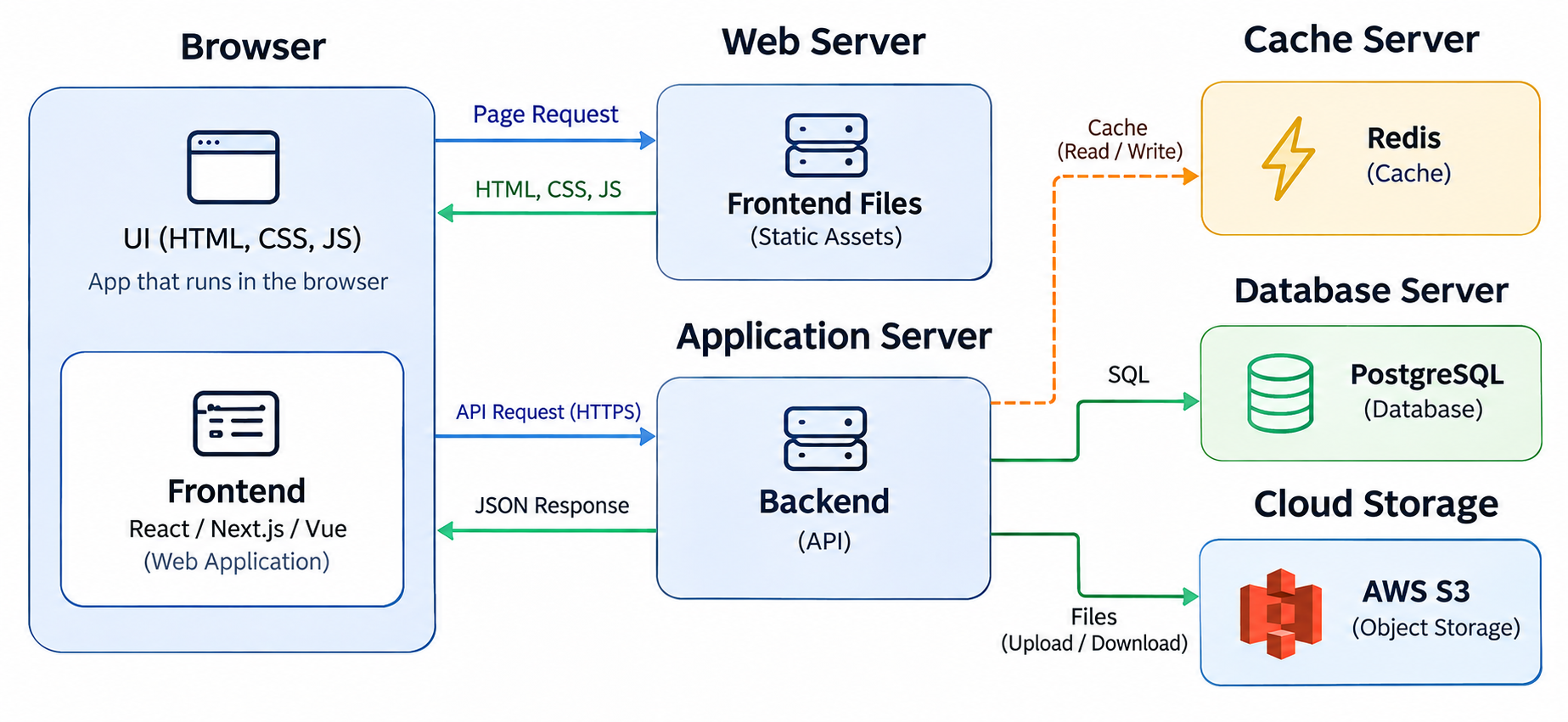
A web app uses different services to load its interface, fetch data, and handle files. The diagram follows those requests from the browser to the web server or the backend API.
 Download image
Loading the app
When you open the app, the browser sends a page request to the Web Server. The server sends back the HTML, CSS, and JavaScript files. The browser uses HTML and CSS to display the interface and runs JavaScript so you can interact with it.
Fetching data
When you open a product list, the frontend sends an HTTPS API request to the Backend running on the Application Server. The Backend retrieves the data and sends it back as JSON. The frontend uses that response to display the list.
If the app uses Redis, the Backend can check whether the list is already cached. If it is, the Backend can use it right away. If it is missing, the Backend sends a SQL query to PostgreSQL and can save the result in Redis for a short time.
Uploading and downloading files
When you upload a product image, the frontend sends the file to the Backend. The Backend uses the S3 API to store the file as an object in an AWS S3 bucket. It can save the object key, which identifies the file in that bucket, with the product record in PostgreSQL.
When a user downloads the image, the Backend can look up the key in PostgreSQL, retrieve the object from S3, and send the file to the browser.