Conditions၊ Loops နှင့် Pattern Matching
3.15.2
Condition အလိုက် code လမ်းကြောင်း ရွေးပါ။ Collection ထဲက value တွေကို loop ပတ်ပြီး လိုရင် ရပ်ပါ သို့မဟုတ် ကျော်ပါ။
ဒီစာမျက်နှာမှာ
Code လမ်းကြောင်း ရွေးခြင်း
if က condition စစ်ပါတယ်။ elif နဲ့ နောက်ထပ် condition ထည့်စစ်နိုင်ပြီး else က ကျန်တဲ့အခြေအနေကို ကိုင်တွယ်ပါတယ်။ Block သတ်မှတ်ဖို့ indentation သုံးပါတယ်။ တူမတူ == နဲ့ စစ်ပြီး value သတ်မှတ်ဖို့ = သုံးပါ။
total = 20
if total >= 20:
print("Free delivery")
else:
print("Add delivery fee")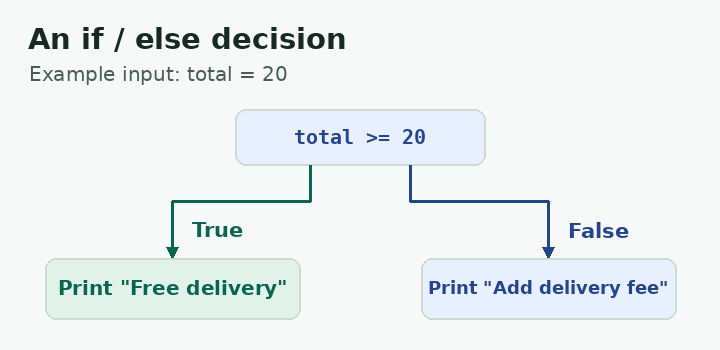 ပုံဖိုင် ဒေါင်းလုဒ်လုပ်ရန်
Free delivery
for နှင့် while သုံး၍ ထပ်လုပ်ခြင်း
for က iterable ထဲက value တစ်ခုချင်း ယူပါတယ်။ range(start, stop) ထဲ stop မပါပါ။ while က condition မှန်သမျှ ထပ်လုပ်ပါတယ်။ break က အတွင်းဆုံး loop ကနေ ထွက်ပါတယ်။ continue က လက်ရှိအကြိမ်ကို ကျော်ပြီး pass က ဘာမှမလုပ်တဲ့ statement ပါ။
for number in range(1, 6):
    if number == 2:
        continue
    if number == 5:
        break
print(number)1 3 4
Value သို့မဟုတ် ပုံစံကို match လုပ်ခြင်း
match က pattern ကိုက်ပြီး guard ပါရင် guard မှန်တဲ့ ပထမဆုံး case ကို ရွေးပါတယ်။ Pattern ထဲက သာမန်နာမည်က value ကို ဖမ်းသိမ်းတတ်ပါတယ်။ စာသားအတိအကျ စစ်ဖို့ quotation marks သုံးပြီး အားလုံးနဲ့ကိုက်ဖို့ _ သုံးပါ။
command = ["show", "Coffee"]
match command:
    case ["show", item]:
        print(item)
    case _:
print("Unknown command")Coffee