Merge and concatenate tables
3.1.1
Combine data safely by checking keys, join type, and the expected relationship between tables.
On this page
Check the relationship before joining
An inner merge retains matching keys. A left merge retains all left rows, and a match on multiple right rows can duplicate left rows. Use validate to assert key relationships. pandas merge can match null keys on both sides, so decide how to handle them.
import pandas as pd
sales = pd.DataFrame({"item_id": [2, 7], "units": [3, 1]})
menu = pd.DataFrame({"item_id": [1, 2], "name": ["Tea", "Cake"]})
merged = sales.merge(menu, on="item_id", how="left", validate="many_to_one", indicator=True)
print(merged["_merge"].tolist())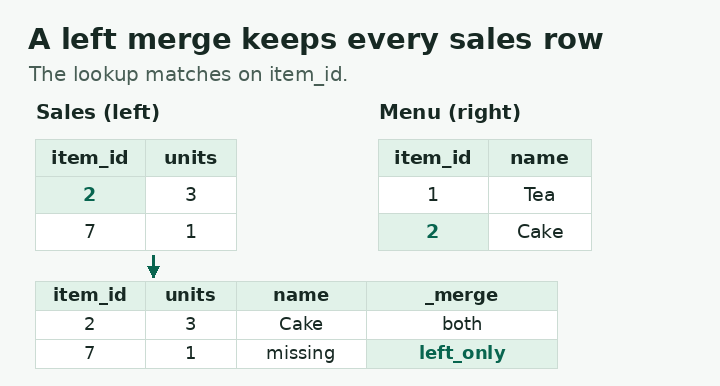 Download image
Example output
['both', 'left_only']
Append compatible batches
concat combines objects along an axis and aligns labels on the other axis. Combine compatible batches together and choose ignore_index=True when old row indexes are irrelevant.
import pandas as pd

batches = [pd.DataFrame({"total": [3]}), pd.DataFrame({"total": [4]})]
print(pd.concat(batches, ignore_index=True)["total"].tolist())
Example output
[3, 4]